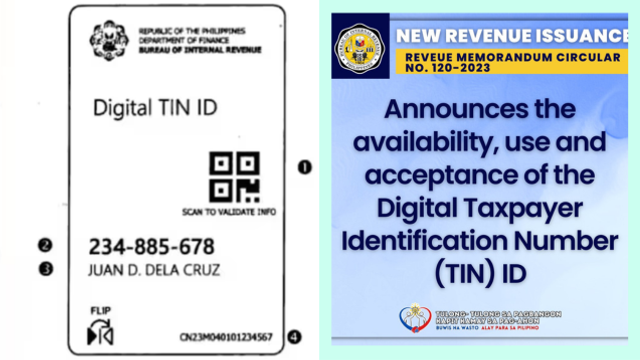
There are few things to be excited about when talking about taxes, but here’s one: the Bureau of Internal Revenue (BIR) has recently launched the Digital TIN ID, a more secure and convenient way for Filipinos to access Taxpayer Identification Numbers (TIN) without lining up at Revenue District Offices (RDO).
According to MC No. 120-2023, the Digital TIN ID is a valid government-issued ID that can be used for various purposes, such as opening bank accounts, applying for jobs, and paying taxes. Those who already possess a Digital TIN ID will no longer need to secure a physical TIN card.
“With this new system, we can eliminate the practice of fixers and scammers selling TIN online while giving taxpayers a convenient alternative in getting a TIN,” BIR Commissioner Romeo Lumagui Jr. said in a statement.
Unlike physical TIN cards, the Digital TIN ID will not require a signature. The authenticity of the Digital TIN ID can be verified through the Online Registration and Update System (ORUS) website by scanning the QR code.
Also read: Need Your National ID Now? This Digital-to-Print Version is Your Alternative
How to apply for a Digital TIN ID
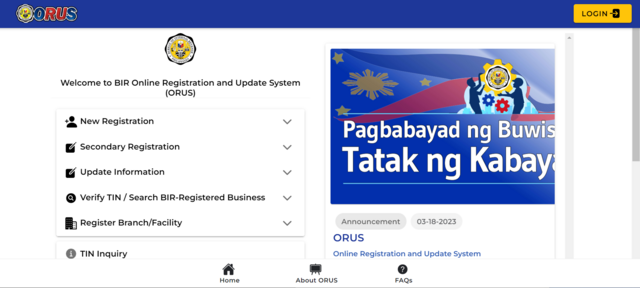
Only individual taxpayers with an existing TIN (no need to own a card) can apply for the Digital TIN ID through ORUS. Applying for a Digital TIN ID is free.
The first step is to update your email address by accomplishing a registration form for the RDO where you are registered. Submit Form S1905 – Registration Update Sheet via email to the concerned RDO or through BIR’s eServices – Taxpayer Registration Related Application (TRAA) Portal.
Once completed, you can proceed with the online registration for the Digital TIN ID.
- Go to the ORUS website
- Register for an account or log in to your existing account
- Select the "Apply for Digital TIN ID" option
- Upload a 1x1 clear photo with white background taken within a six-month period
- Complete the required information
Not that you’ll do it (we hope), but it’s worth mentioning that users who upload unrelated images of animals, cartoons, or other people’s pictures will be charged with penalties by the BIR.
Once your application has been processed, you should be able to download your Digital TIN ID. You can also opt to print your Digital TIN ID if you want to be extra.
READ ALSO: Passport Renewal With Name Change For Mom, New Passport Application For Baby! A Guide
This story originally appeared on Spot.ph.
*Minor edits have been made by the SmartParenting.com.ph editors.
What other parents are reading

Lorem ipsum dolor sit amet, consectetur adipisicing elit, sed do eiusmod
Lorem ipsum dolor sit amet, consectetur adipisicing elit, sed do eiusmod