
The National Capital Region and many other provinces and municipalities around the Philippines are back yet again on enhanced community quarantine (ECQ) status to stem the tide of the Delta variant. Please take it seriously because this variant is more contagious.
Stuck at home, we know it will be hard to say no to the kids when it comes to screen use (you probably need it, too, for self-care *wink*), but you don’t want them to overdo it.
The good news is Netflix hopes to give its Filipino subscribers who are parents a much better viewing experience with its parental control and new features for kids.
Parental controls on Netflix
If you didn’t know that Netflix had parental controls, now is the time to set it up and activate its latest features. Remember, your 6-month-old can figure out quickly that swiping will mean lots of...colorful pictures. So the first step is to go to your Netflix account and open the Profile and Parental Controls.
Set up a PIN to lock profiles
You can assign a four-digit PIN to EVERY profile to prevent kids from using yours or their own (go to Profile Lock). This can be helpful to manage screen time for younger kids — she will need you to gain access, and you can set up her solo “movie time.”
If you don’t want your kids to set up additional viewing profiles without your permission, select “Require PIN.” Netflix has also made it convenient for the PIN to apply to all devices with your Netflix account (based on your subscription plan).
Filter out titles that are not age-appropriate
There are two ways to make sure your child watches shows appropriate for his age or maturity level. One, go to the Viewing Restrictions setting to change the maturity rating that applies to your child’s age (Netflix customizes the filters using country ratings). Once set up, the movies and shows on your child’s profiles should be safe for him to watch.
Now, if you want to make doubly sure your child doesn’t end up watching R-rated titles, then go to “Title Restrictions.” Netflix allows you to remove individual series or films by title. Those listed here will not show up on your child’s profile.
By the way, let your kids know, especially the tweens and teens, that you can see their viewing history to avoid any "this is private" battles. (In case you didn't know, you can also see yours and your husband’s LOL).
Turn OFF auto-play
We think this is one of the most underused functions on Netflix. When this is turned on, the next episode in a series will play automatically. You can disable it on the Playback settings.
Personalized viewing for kids
One of the biggest “problems” on Netflix Kids is choosing what to watch because there are just so many! The streaming service hopes to help with family movie night decisions with Top 10 Rows and recap emails.
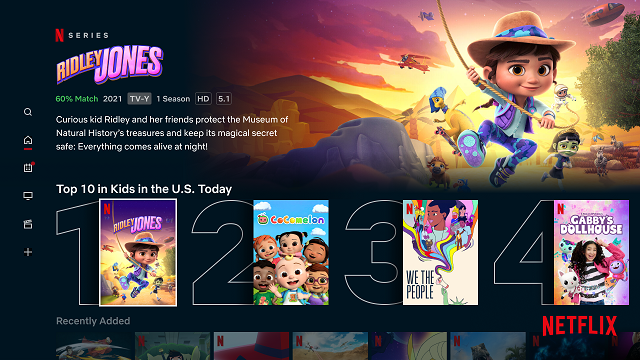
And if you still need additional guidance, Netflix will now send bi-weekly kids recap emails that will recommend shows and movies based on your child’s favorites or the types of programs your child enjoys the most.
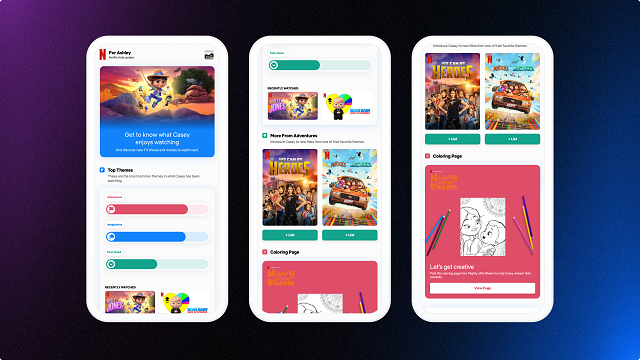
The recap emails even come with printable coloring sheets and activities inspired by your kid’s favorite characters. Perhaps to help you actually finish a movie?
VIVO is premiering today on Netflix! The animated musical adventure features all-new songs from Lin-Manuel Miranda, It is about a kinkajou (rainforest “honey bear”) who wants to deliver a song to his cherished owner’s long-lost love and along for the ride is Gabi, an energetic tween who beats to her own drum.
What other parents are reading

Lorem ipsum dolor sit amet, consectetur adipisicing elit, sed do eiusmod
Lorem ipsum dolor sit amet, consectetur adipisicing elit, sed do eiusmod